
For my birthday this year, my wife got me a Commodore 64 Ultimate, a brand new FPGA emulation of the original Commodore 64, with some bells and whistles. Why did I want one of these, considering it came out 3 years before I was born and I’d never interacted with one in my life? Well, I guess I just like gadgets / little computers / game systems in general–I say this while looking at my Panic Playdate, Picade, Steam Deck, Switch 2, MPC One+, Quest 3, … You get the idea.
I thought that I’d maybe get an actual CRT monitor to use with it, but honestly I just do not have the space in my office anymore, it is so packed with crap. So then I was faced with a dilemma: do I keep an extra LCD on my desk, taking up valuable space, or do I just switch my ultra wide OLED monitor over to it when I want to use it? Neither solution felt great, the most ideal solution would be if I could just have the Commodore 64 display in a window on my Mac…
Oh, duh! I have a Elgato Game Capture 4K X, I can just use that. But the software for that thing is really laggy and makes my Mac feel like a piece of shit. So that’s not really ideal either.
Eventually I stumbled on c64stream, an OBS source plugin that builds a video feed off of data streams sent by the Ultimate device over the network. Once I got that working, I thought… job done! But only for a moment. OBS is pretty heavy duty software, and there’s no real clean way to just get rid of all the GUI in windowed mode, so this wasn’t ideal either.
At this point, my software developer instinct kicked in and I thought, “You know what, I can probably point Claude Code at the c64stream repo and tell it, ‘Build me a simple macOS app that can view these data streams, too,’ and it will.” So, that’s what I did. And you know what? I was right. I could do that, and it worked, with minimal iteration. I had a basic viewer app.
Now, I don’t want to waste a bunch of your time, or end up repeating myself. I cataloged what happened from there over on my Discourse forum, so if you’re really interested in the iteration of the app from where it started to where it ended up, you can check out my devlog thread over there.
Long story short, I kept finding more things I wanted to do with my Commodore 64 Ultimate, which I could do through a variety of existing means, but none of which felt as nice as it would be to have a native macOS app that could do all those things. So, I kept building features in, and ultimately ended up with a very nice looking app that has essentially all the basic features you could possibly want (I’d guess) from an app for your device.
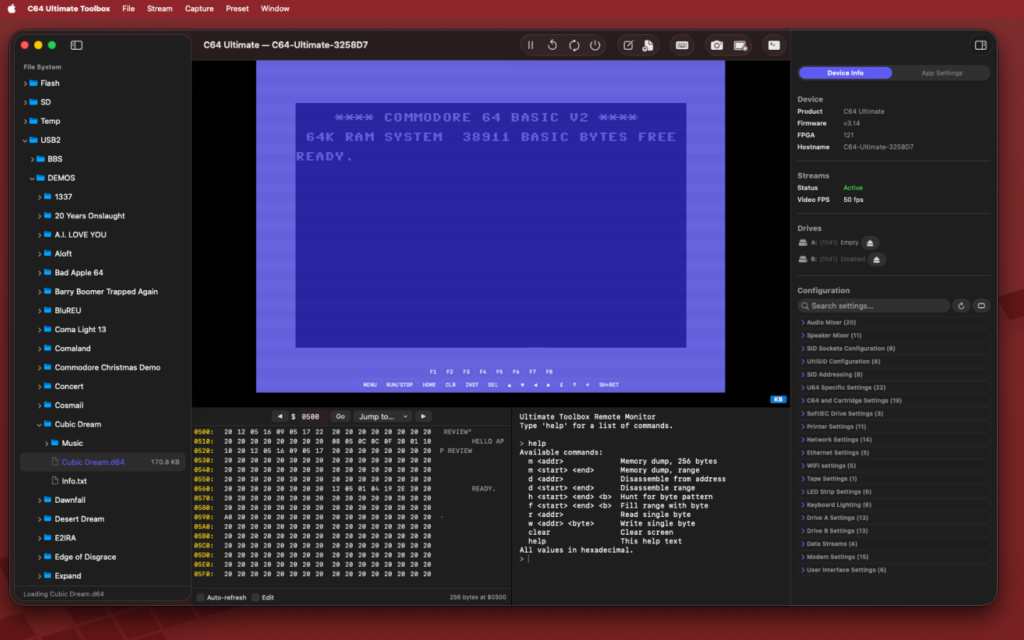
Earlier today I wrote up a simple list of features for a Reddit post, I might as well just copy those over here…
- View and hear your Commodore 64 Ultimate or Ultimate II device over the network, with a fully configurable CRT shader so you can dial in just the right retro feel.
- View and manage files on your device, including support for drag and drop folder/file upload, as well as the ability to run and mount disks, create new disk images, and more.
- BASIC Scratchpad is a mini-IDE in the app where you can write BASIC apps and send them directly to any of your connected devices to run.
- Keyboard forwarding allows you to interact with your device with your computer keyboard, includes a keyboard overlay for Commodore specific keys your keyboard definitely doesn’t have.
- Visual memory viewer and editor, along with a terminal-like memory viewer and editor for debugging and tinkering.
- Built-in support for recording videos and taking screenshots cleanly.
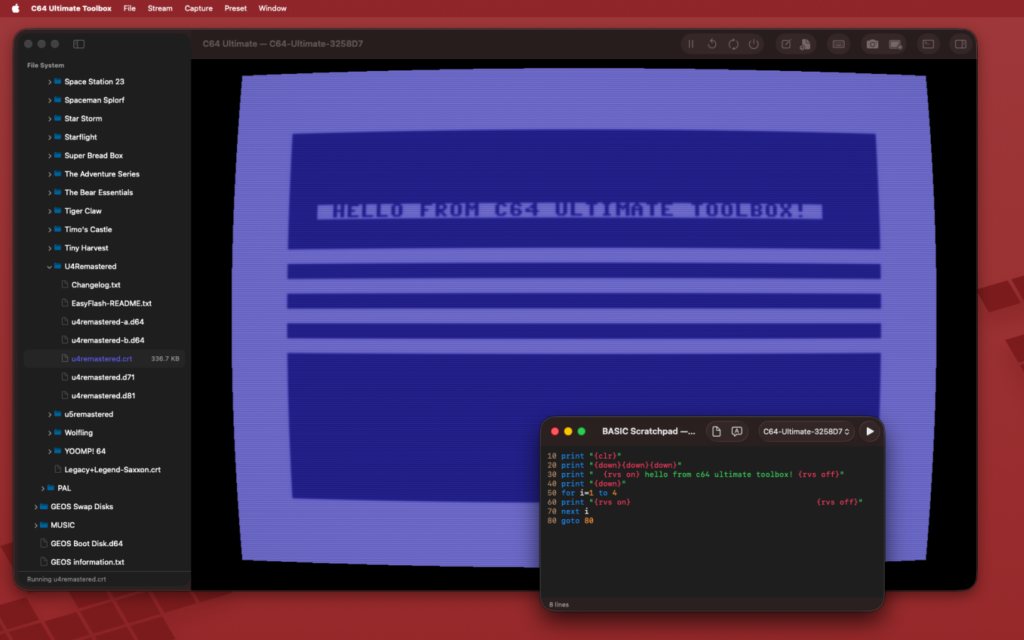
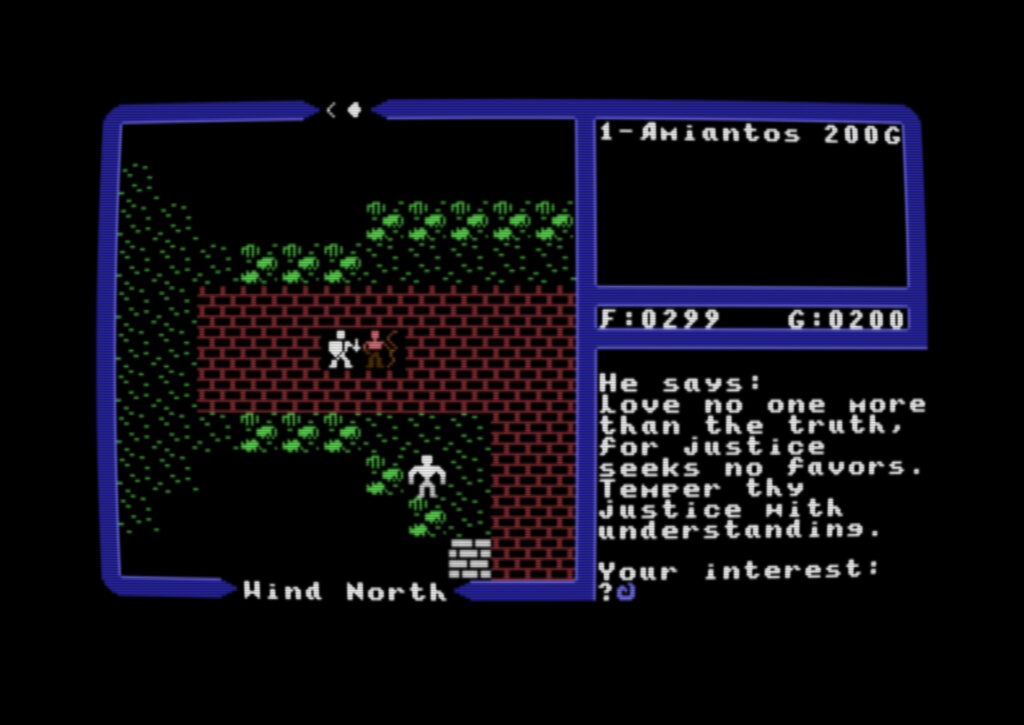
I’ve been using it to play Ultima IV for the first time, which has been a lot of fun. I really like the “Arcade” CRT filter preset in the app. Maybe it’s just my bad memory, but it really looks like what CRTs looked like in the arcade on old machines, down at the Pizza Hut restaurant. Am I wrong?
This is my second Apple platform app I’ve built with Claude Code. The first one was Postalgic, nearly a year ago, and at that point in time, Claude Code was a huge pain in the ass. It’s amazing what can happen in a year. It’s probably half Claude Code getting better, and me spending the last 10 months learning how to use Claude Code most effectively, but Claude Code was every bit a very capable junior developer with an unending appetite to solve problems. Not always correctly, of course, if I was not there every step of the way, this app would not be as nice as it is now. But if Claude Code was not there, this app probably would have taken me a lot longer to build and it would also not be as nice as it is now. So, I guess it’s kind of a yin/yang thing. Sorry, I don’t have any real specific reflections other than “This project went really well and Claude Code did not get in my way constantly like it used to”.
Oh, I also really like the icon I made for the 2.0 release of the app. It’s so nice! No AI involved, just me and Figma, so don’t get mad at me about it.
Anyhoo…
As always, the app is free open source software, you can find the source and download links over on GitHub: https://github.com/amiantos/c64-ultimate-toolbox
You can also optionally buy C64 Ultimate Toolbox for $4.99 on the App Store to support me, and get automatic updates when I release new versions.