I had the immense privilege of being able to attend Edinburgh Fringe for about a week this year. I’d never heard of Fringe before this year, but I’ll certainly remember it fondly for the rest of my life.
I was able to see a whopping 11 performances while I was in Edinburgh, and I thought it would be nice to write up my thoughts on each of them, to aid in future reminiscing about how fun it was.
Techies
The first performance we saw was also the longest, clocking in at a whopping 2 hours. We came to see this one because my niece was in it, and it was a solid college-aged musical. It was kind of a mix of Glee and, um, well, Glee, I guess, as it followed a group of theatre techs butting heads with the thespians. There was a play-within-a-play, a Hamilton-style retelling of the exploits of Charles Darwin. Despite being kind of dated, the Hamilton-esque musical numbers really captured the absurdity of Hamilton and were funny every time. There was also a subplot involving a young, socially awkward goth light tech, who had probably the standout song of the show where she yearned secretly for one of the actors. One of the other actors also had probably the best singing voice I’d heard at Fringe.
The Distance
Good lord, what an outstanding hour of theater. The Distance is a one-man show where Ben Norris plays Chris, telling us the tale of his Olympic long-distance running aspirations, all the while running. Not just running, but running, flat out on a treadmill, for almost the entire performance. Not only is the story heartfelt, relatable, and moving (I cried, as I usually seem to), but the raw feat of athleticism is awe-inspiring. Simply incredible, I am so immensely glad I got to see it.
Sophie’s Surprise 29th
This was the only circus act we saw, and it was a doozy. Definitely a Las Vegas quality routine, complete with a bunch of 90’s nostalgia piled on top. The highlight for me was the guy at the end unicycling naked, trying to keep his penis from flopping out. What a feat of athleticism as well, that was, and I know, because I can unicycle too. But not like that. At the end he had the “Sophie of the night” (a random female audience member) up on his shoulders, with the unicycle wheel on fire. It was nuts. The cast was working the audience before the show and they were hilarious, all playing their various parts. Just great fun all around, and I didn’t even cry once.
Awaiting Evaluation
My niece recommended this one to me after we saw Techies, and there were two actors in it that were in Techies, which was a nice surprise. This was essentially Waiting for Godot, which I am woefully unfamiliar with, recast as two boys waiting their punishment for misbehaving in a private school (think Dead Poet’s Society). Lots of existential and philosophical chatter, a lot of will-they-won’t-they gay flirting between seemingly straight friends, and a touch of suicidal ideation. This was a lot of fun, and there was some surprising stunt work involved (later I learned the writer and actor is a stunt performer in some films, so it made sense). Both lead actors were really good, and I hope to see them in more stuff in the future.
Supernova
The first time we tried to see Awaiting Evaluation, we were 20 minutes late because I do not know how to schedule things. While sitting outside trying to decide on what to do, a girl handed us a flyer for Supernova, telling us it was her friend’s play. So we decided then and there to go see it.
This was a one-woman show in a very small space (maybe room for 20 people total?) where Liza Dealey-Thomason recast herself as a superhero whose super power is to remain positive even as members of her large family keep dying from illness or suicide. It was a lot! She was up there sharing her trauma with us, all while singing and doing villain voices. And somehow some guy fell asleep and started snoring! At 12pm, two feet from the performer! Liza really had to lean on her superhero resiliency then, I think.
This, too, was a lot of fun, except for the constantly holding back my tears.
If Aliens Attack, I’d Die First
Another one where we went to see it basically right after someone handed us a flyer. This was maybe the weakest play we saw, almost something like a pilot for a sitcom where we’re following young college students sharing a flat during the early stages of an alien invasion. The performances were good, and there were some laughs, but like some late-episode SNL sketches, they didn’t really know how to end it, so it just… stopped.
Adults Only Magic Show
This promised to be a magic show with penises, and it delivered. I don’t know how to rank magic shows, as I believe this is the only in-person magic show I’ve ever been to, but I was pretty impressed by the magic overall, and the show did deliver a couple exposed penises, flopping around hilariously. If you like Australian accents, everyone in this show has one, which is also a good time.
The Body I Left in Susquehanna National Forest
Wow! This one came out of left field in a number of ways and is definitely a play I will probably never forget. This follows a couple on their way to their honeymoon in Niagara Falls, when they hit something (someone) on a road in the dark. While the couple discusses (argues about) what to do, shit starts to get weird (the body starts talking), and then gets even weirder. I don’t want to say too much about it, because it’s just so much fun to experience without having any idea what is going to happen. The two female leads were outstanding, and the male performer did his best to bring some humanity to a character who you’re really not meant to like.
A Little Green Leaf
This was about Odette Hallowes, a spy for Britain during World War 2 who was captured by the gestapo, tortured and held for over two years. It’s told through a conversation she has with a US soldier. A great small scale lesson on history and heroism, with outstanding performances. The male actor ends up playing American, British, and German soldiers at various times and his voice acting skills were stupendous, there were times it was hard to believe it was the same man playing each role.
& taxes
This was advertised as “a clown show about death” and the flyer alone made me laugh, so I had to see it.
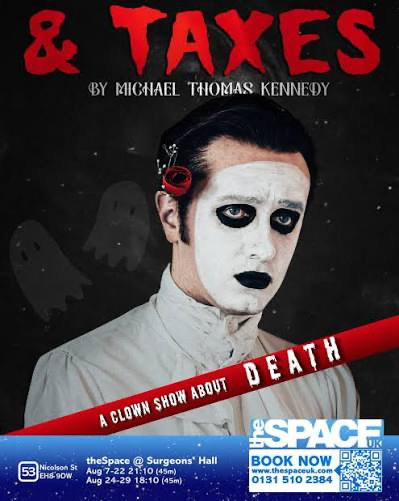
I would say ultimately it was more like a stand-up comedy show with props, which is maybe what a clown show is. Well, “comedy show with props” might make you think Carrot Top and this wasn’t Carrot Top. I don’t really know how to describe it. It was a hybrid, I guess, comedy, some introspection about death, lots of laughs. This shit really cracked me up. At one point Jasper extracts a lot of laughs with some stupid inflatable saxophones, and I just had to buy one of my own when I got home; only to find you have to buy six at a time, so now I have six inflatable saxophones, and I want to name a dog Jasper some day in honor of this Michael Thomas Kennedy’s routine here. Super glad I saw this one, too!
Elf Lyons is The Woman on the Edge
This shit was a tour-de-force, I don’t even know how to describe it. A non-stop hour of what feels like stream-of-consciousness, where Elf Lyons is waltzing across the stage, pretending she’s wearing heels the entire time (how!?), recounting relationships and failed dates and the ridiculous shit men say, all while spattering Apollo 13 movie references throughout. Honestly, as a man, I may have been too stupid to really follow it, and undoubtedly my wife was laughing at many of the jokes because they reminded her of how absurd my existence is. I had to, of course, keep resisting the urge to turn to my wife to make sure she’d already heard of the great clown Pagliacci, which is also undoubtedly something Elf Lyons predicted and did on purpose. All in all, a great way to end our week of Fringe, because this had a bit of everything in it. The physicality / athleticism of her performance, her wit, the poetry in her prose, it was really a killer crescendo.
If it didn’t cost so much money, and there weren’t so many other places to visit on Earth, I would go to Edinburgh Fringe every single year for the rest of my life. If you love the performing arts, there’s nothing else like it as far as I know.